Posts

Showing posts with the label Problem Solved

Renewal of Philippine Passport!

Image
My passport is not yet due but I have a few plans in my head that involved me getting a new one before we go on our next travel. I've been reading the same site about the requirements of securing an ID and 3 documents. I have no problems with IDs but documents I do. I only have a birth certificate and I cannot afford the time it would take for me to get a Barangay, NBI and police clearances. I asked around and got a good answer from a neighbor who just got hers renewed. Truly enough it's the same set I was asked: 1 Government ID (+ photocopy. It seems like they preferred my SSS over my driver's) 1 Document (NSO birth certificate (and photocopy) BUT this is just to ensure that if I was asked a document I came prepared. I didn't have to submit it at all, it was returned to me with the photocopy BUT I can still overhear some of age being asked for it especially the original NSO copy) Old Passport (+ photocopy of 2nd page and last page) Printout of your appointment ...

PS: You are now entering... the Lightzone

Image
I'm in a budget phase right now and even if I fell in love with Lightroom, it was just too costly for me. And my machine haven't even experienced pirated stuff (yes I use GIMP not Adobe CS6 as I wanted) ever since I had it (a good 5 years I think?) and I just can't lose that streak. So, after all the research I went through ( a good 10 or 20 minutes earlier today) I ended up downloading LightZone. It used to be a commercialized product only to become open source for cheapskates like you and me. I would have tried Darktable but I can't seem to make Linux work (after 5 minutes I gave up already so I wouldn't know if I've pushed to 10 minutes I would have succeed who knows). So let's just hope they'd release a Windows version. For now, let's use Lightzone. It's a bit like Lightroom, they have tools on the right, filters on the left. You don't need to do imports here though, just simply click on an image. I'll come clean to tell yo...

Problem Solved: Fast Duplicate Finder

Image
Is your machine filled with duplicate files? Were you in frenzy copying files to and fro different folders and forget where these might have gone? Are you starting to arrange your files but is stuck on the ordeal because of duplicates? I said yes to all of those and just this free day of mine I decided to put an end to to it. My drives are all filled with duplicates that I have now no idea how to arrange them all. So I went to look for a duplicate finder which is much better than the old one I had which only looked at the similar file names so I ended up checking each picture, the purpose already was defeated. Fast Duplicate Finder is different, it checks sizes, times and assess how similar the files are. They also provide deletion in batch so all you need to do are a few clicks and you're done. I only downloaded a free version so there's a few limitations I can work with. Here's a list from their website: Download your free version on this link below: htt...

PS: Removing Labels in Blogger

Click your blog in the dashboard. Go to Posts. Click on a label (clickable orange text next to the blog title). You may also click on on the upper right dropdown list of labels to show the specific label you want to show. The list will refresh to show you which posts use that label. Click on the tag icon and choose from the drop down menu the label you want to remove from that post. Take note that if a post DOES NOT HAVE THAT LABEL, it adds the label automatically. All posts selected SHOULD have that label to have them removed. If successful, a message will prompt of the removal. EXTREMELY IMPORTANT TIP: If you are decluttering labelsin batch, make sure that before proceeding with the next label, REFRESH that page first. This act makes sure that no blog has been ticked. I almost have thrown my laptop when after removing a label, it adds them to multiple posts afterwards :-( Another behaviour you should be aware of: once there is no post with that label, that label will ...

PS: BPI E-Prepaid to Paypal

Image
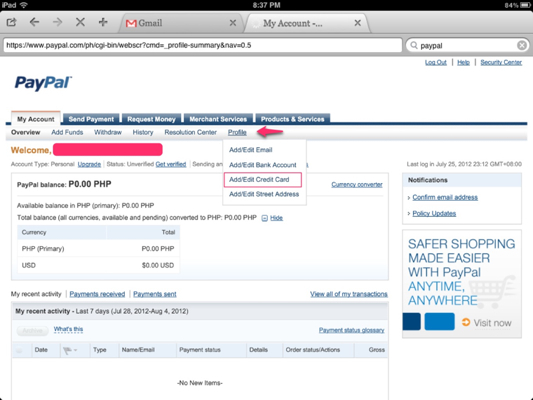
NOTE: If your question is answered on the post itself, don't expect any replies. You are just insulting me for not reading what I painstakingly wrote. So now you have your BPI E-prepaid credit card eh? If you have the same reasons as mine in getting one, which is using it for online purchases, you must be itching to attach it to Paypal. Here's a fairly easy guide on how to do that (much easier than typing in Ipad I tell you) Like I mentioned in my BPI E-prepaid post, once you receive your card you have to enroll it online so that you can fund your card without going to the bank personally. You need to bring the print out to the nearest BPI branch. If I remember correctly it took a week before it appeared on my online account. But since this is a credit card, it will NOT appear on My Portfolio, but rather, on the reload options. Now going to Paypal, sign up if you still don't have an account at www.paypal.c om Go to My Account > Profile > Add/Edit Credit Card ...